HQ A FIELD MANUAL FOR REAL BUILDERS
AI for your actual job.
Not 100 ChatGPT prompts.
Real workflows
that replace real work.
not busywork.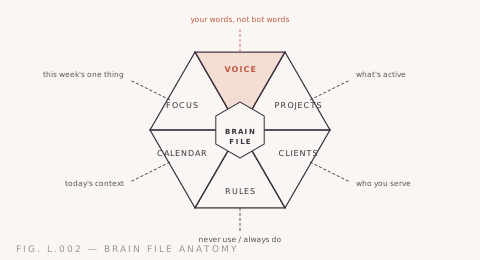

Not 100 ChatGPT prompts.
Real workflows
that replace real work.
not busywork. Fig. L.002 — Free, every Wednesday
FREE come inBefore you buy anything, come hang out. Every Wednesday I run a free session — bring what you're using AI for, we look at it together, and you leave with one thing to try in your own work. No pitch, no question too basic. Reserve a seat and the calendar invite lands in your inbox.


Fig. L.002a — The stack
AI at work isn't one switch you flip. It's four layers that stack — get the bottom one right and everything above works better. Skip it and you're pasting prompts forever.
A one-page brain file — who you are, how you talk, what you'd never say. The layer everyone skips.
Save the prompts and workflows that work into reusable skills. Stop rewriting them every Monday.
When a task repeats enough, build the tool — a tracker, a generator, a small app.
Once it works for you, make it work for the room — shared context, shared methods.
Fig. L.002b — Free starter
Before the fancy prompts, give Claude the context. The free starter is the exact one-page brain file I set up with every client — your voice, your business, the words you'd never say — plus a couple of drop-in skills. Hand it over and Claude stops writing in default-bot. Twenty minutes to set up, and it's the layer everything else stacks on.
200+ women started here.
Fig. L.002c — By role
Fig. L.002d — Tool cheat sheet
Honest version: they're all good, and the right one depends on the job. ChatGPT is the friendly generalist — fast, everywhere, great for quick questions, brainstorms, and first drafts. Claude is the one I reach for when the writing matters; it holds your voice better and follows long, specific instructions without drifting. Claude Code is a different category entirely — not a chat, a place to build, working directly inside your files.
For most business work, you'll live in a chat, so use whichever you like for thinking out loud. The moment you want AI that sounds like you every time — not just when you nail the prompt — that's where context and Claude earn their keep. And the day you want to build something real instead of talk about it, that's Claude Code. The table is the cheat sheet.
↳ chat vs assistant vs builder
| Use case | ChatGPT | Claude | Claude Code |
|---|---|---|---|
| Quick questions & brainstorms | Fast & friendly | Great | Overkill |
| Long-form in your voice | Drifts over length | Holds your voice | Not its job |
| Multi-step instructions | Loses the thread | Stays on track | Strong |
| Build a real tool or app | Hands you code | Hands you code | Builds in your project |
| Same quality every time | Needs re-prompting | Best with a brain file | Solid with a brain file |
★ = reach for this one first · Claude column shaded — it's the house pick for work that has to sound like you.
Fig. L.002e — From the Lab
A prompt that takes your business goals and builds a focused 90-day marketing plan — priorities, channels, content themes, and weekly actions.
A prompt that takes one piece of content and turns it into 10 platform-ready pieces — social posts, email snippets, threads, and more.
A prompt that maps your repetitive tasks and builds a plan to automate them with AI — what to automate, what tools to use, and how to set it up.
A prompt that turns messy meeting transcripts into structured notes with clear action items, owners, and deadlines.
A prompt that turns your discovery call notes into a professional proposal with scope, timeline, pricing, and terms.
A prompt that assembles a virtual advisory board of 5 experts to debate your business question and give you real, actionable advice.
Fig. L.002f — Proof
 Plate P.01 · automation
 Built an AI-powered content machine for B2B SaaS that turned a month of content production into a 3-day sprint.
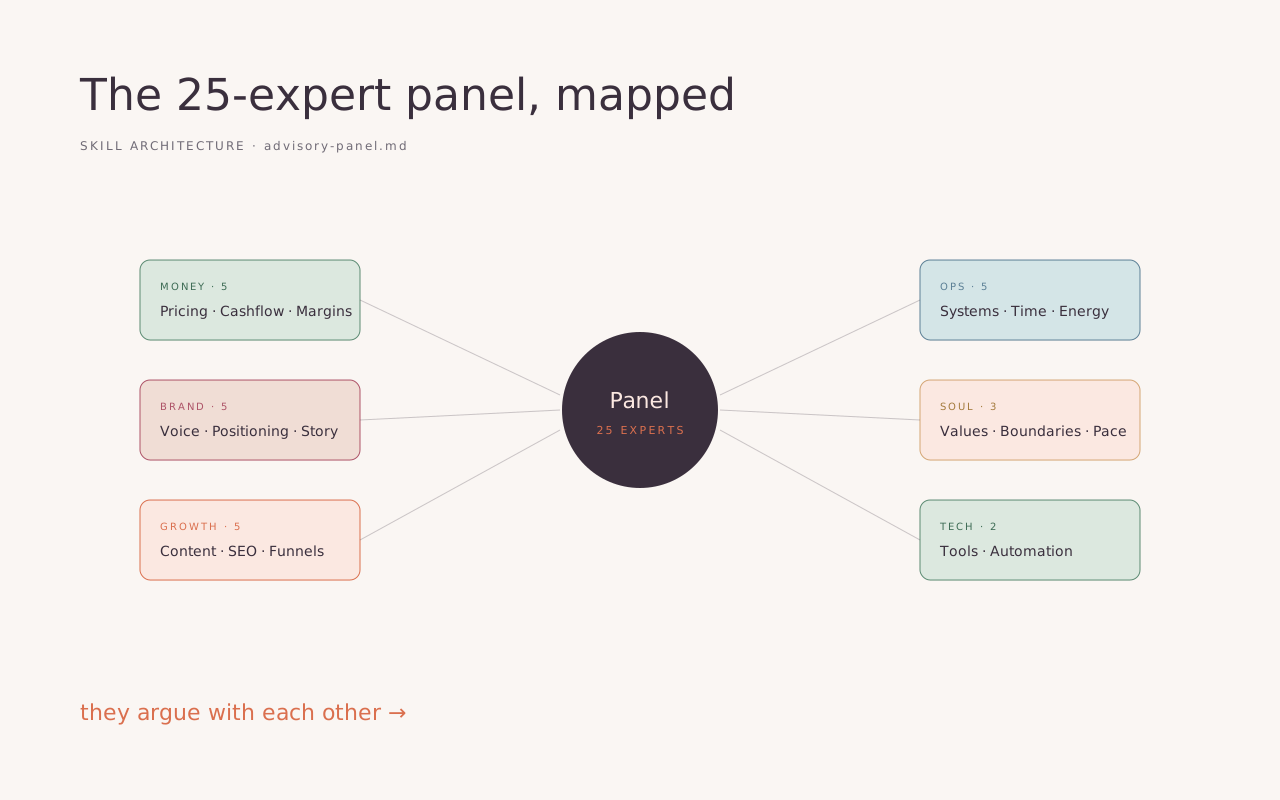 Plate P.02 · skill
 A 25-expert advisory board that lives inside Claude and knows my entire business context.
 Plate P.03 · automation
 A prospecting automation that sends 50 personalized outreach emails every Monday. Designed but not yet deployed.
 Plate P.04 · automation
 Built custom GPTs trained on brand voice, product catalogs, and FAQs — turning generic AI into tools that actually sound like the business.

Four weeks, a small group of women, one real thing shipped — a tool, a system, an automation that takes work off your plate for good. You build between sessions and get unstuck in the room. Solo, most people stall.
Fig. L.002h — FAQ
The one you'll actually use every day. For most small businesses that's a good chat assistant — ChatGPT or Claude — with the context set up so it knows your business. I lean Claude for anything writing-heavy because it holds your voice better, but the tool matters less than the setup. A cheap tool with a solid brain file beats an expensive one you prompt cold. Start with what you have, give it context, and only add tools when you hit a real wall.
Honestly, more than you'd believe on the repetitive stuff and less than the hype claims on the hard stuff. The wins are in the work you do over and over — content batches, proposals, reports, meeting follow-ups, the admin nobody pays you for. There, hours-to-minutes is normal. It won't think strategically for you or replace your judgment. The time it frees up is meant to go back into the parts of your work only you can do — that's the actual point, not doing the same job in less time.
ChatGPT is plenty for a lot of people, especially for quick questions and brainstorming. I reach for Claude when the writing has to sound like me and when I'm giving long, specific instructions — it drifts less and holds voice better. You don't need both. Pick the one you'll open daily, set it up with context about your business, and get good at that. The setup matters far more than which logo is on it.
Not the way a person can, and that's the wrong frame. AI is great at the parts of assistant work that are text and pattern — drafting, summarizing, formatting, first passes, research. It's useless at judgment, relationships, and knowing what you actually meant. If you have a VA, AI makes them faster and frees them for higher-value work. If you can't afford one yet, AI covers a real chunk of the gap. Think teammate, not replacement.
It can't decide what matters. It can't hold a relationship, read a room, or take responsibility when something goes wrong. It'll happily produce confident, wrong answers, so anything that ships still needs your eyes. And it can't replace taste — knowing which of five good options is actually right for your business. AI is a fast, tireless drafter and researcher. The strategy, the judgment, and the final call stay yours. That's not a limitation to fix; it's the part of the job that's yours to keep.
Pick one annoying, repetitive task you do every week. Not your whole business — one task. Open Claude or ChatGPT, tell it what you're trying to do in plain English, and go back and forth until it helps. That's it. You learn this by using it on real work, not by studying it first. When you want a faster start, the free brain-file starter sets up the context, and the free office hours are there to get you unstuck without spending a dollar.
For most solopreneurs, yes — twenty dollars a month against the hours it saves on content, admin, and research is rarely a close call. The real cost isn't the subscription; it's the time to set it up well, and that's a one-time investment that pays back fast. Start on a free tier if you want to feel it out. The moment it saves you one afternoon a week, the paid version has more than covered itself.
Don't hand them a tool and a login and hope. People adopt AI when they see it solve a problem they actually have. Start with one shared brain file so everyone's output is consistent, pick a couple of real workflows the team does constantly, and run a session where they build something with their own work — not a demo. Then make the good prompts shared, not tribal knowledge. That's most of what my team workshops do, and it's the difference between a tool nobody opens and a habit.
Treat it like any other vendor: read the data terms, and don't paste anything you wouldn't put in a Google Doc. The paid business tiers generally don't train on your inputs — check the current terms, since they change. For genuinely sensitive client data, anonymize before you paste, or use it for the structure and fill in the specifics yourself. Most business work is fine; a little judgment about what goes in keeps you out of trouble. When in doubt, leave the names out.
You don't, and trying will burn you out. The tools change weekly; the skill underneath — giving good context, describing what you want, steering the output — barely changes at all. Get good at that and you're future-proof regardless of which model is on top this month. I follow a few people, ignore most of the noise, and only change my setup when something clearly saves me time. Pick one source you trust, and let the rest go.
Got a team? Workshops and multi-week training bring all of this to the whole room — shared context, shared methods, everyone actually using it instead of one person quietly doing the AI work for everybody.
For teamsFig. L.002i — The Rooms
If the cohort isn't right for you, here's the rest of the build path. Plain prices, no discovery call.
You've got one specific thing you want moved — today, not someday.
You want AI to become the way you work — not a one-off trick.
You want AI to stick across a team, past the workshop high.
Real talk: the prices are the prices. No ‘let’s hop on a call to scope it.’ If the number works, book it. If not, email me — I’ll point you somewhere free.
Prefer a room of women? The cohort →Fig. L.002j — From the Notebook
I started using Claude for my business. Then I realized my personal life needed it more. Meal planning, health stuff, big decisions, even figuring out what to do on a Saturday.
Every founder I talk to eventually asks the same question: when do I hire a marketing person? It's the wrong question.
And every year, something changed. The algorithm shifted.
The mental load is real and it's crushing. Meal plans, school stuff, doctor appointments, the thing you forgot to sign — here's how Claude handles the invisible work so your brain gets a break.
Save your spot. Calendar invite goes out right after.
Check your email for a Google Calendar invite with the Meet link. See you then.
You've read enough. You know the thing you want to build and you'd rather do it in a room than alone. Get in — four weeks, one shipped tool, people who keep you honest.
See the cohort & apply →Not the right month, or just getting started? Get on the list — I'll send new workflows and a heads-up when the next room opens. One click out anytime.
Pick a session type to get started.
Times shown in your time zone
Pick a weekday